
Welcome to the Community Hub!
You're in. This is your private student community — the place to ask questions, share wins, and get real support as you put AI to work in your design business.
Take five minutes to get oriented below, then jump in. The sooner you post, the sooner this space starts working for you.
START HERE
Your Orientation to the Hub
01
Read the guidelines
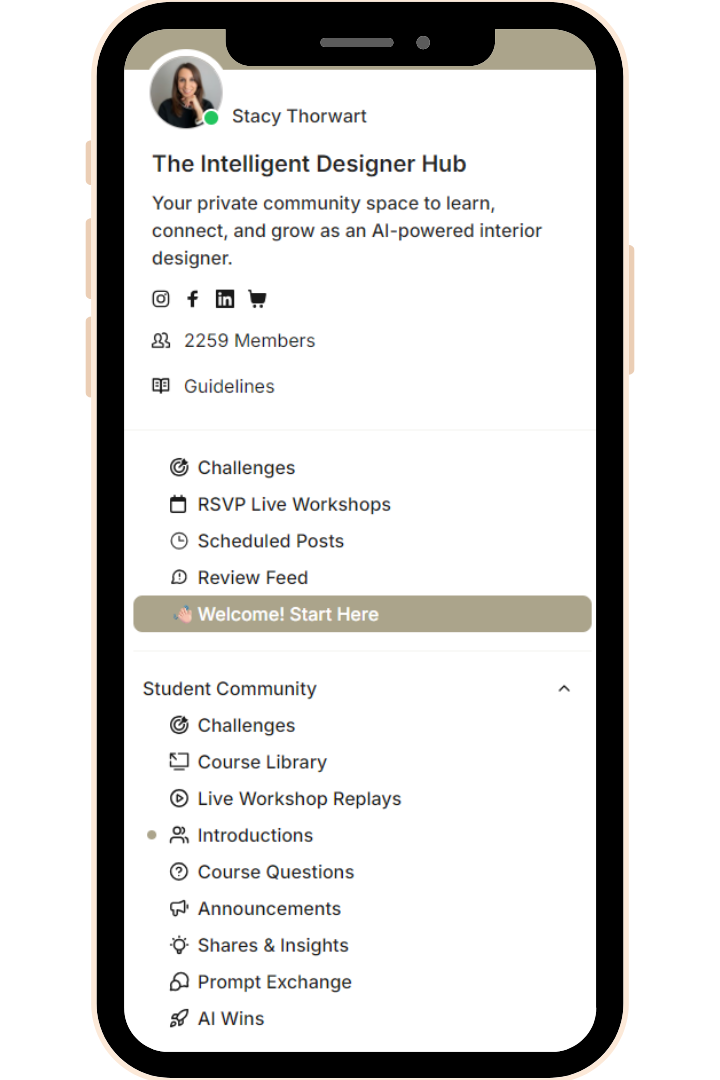
You'll find them in the sidebar, just below the member count. They keep the Hub valuable for everyone.
02
Introduce yourself
Post in the Introductions channel, then read a few other intros and leave a comment — it's the fastest way to start making connections.
03
Explore the channels
Course Questions, Hub Announcements, Shares & Insights, Prompt Exchange, and AI Wins.
04
Dive into the video lessons
Every course in the Hub is open to you right now. Not sure where to begin? See the guide below.
05
Join the monthly live workshops
Each month, we’ll build a practical AI workflow together, followed by a community implementation challenge. Each call date will be announced inside the community and via email, and recordings will be added to your Member Library.
🧭 NOT SURE WHERE TO START?
Start with AI Foundations for Interior Designers. It gives you the core AI knowledge and Claude skills you’ll need before moving into specialty courses and live workflows.
📍 GOOD TO KNOW
Find your courses: Select AI Course Library in the left sidebar to open your Member Library.
Stay up to date: Bookmark this page for easy access, and download the Kajabi app to watch lessons and participate in the community from your phone.
Stay up to date: Check the Announcements Channel regularly for new courses, updates, and upcoming live call dates.
NAVIGATION
Hub Channels
Here’s where to learn, ask questions, and connect with the community:
- Challenges - View and complete each month's implementation challenge.
- Course Library – Access all the AI courses included with your membership.
- Live Workshop Replays – Watch past live workshops on demand.
- Introductions – Introduce yourself and meet fellow designers in the Hub.
- Course Questions – Ask questions and get support as you work through the lessons.
- Announcements – Find important updates, including new courses, lessons, and live call dates.
- Shares & Insights – Share what you’re exploring, what’s working, and what you’ve learned.
- Prompt Exchange – Share useful prompts and discover what other members are using.
- AI Wins – Celebrate your progress and share your wins—big or small.
POSTING GUIDELINES
What to share
To keep this space valuable, here’s what works best:
✓ HIGH VALUE POSTS
-
Questions that invite discussion
-
Here’s what I did + how I did it
-
Wins
-
Ideas from your own learning
✕ LOW VALUE POSTS
-
Opinions without action or experience
-
Self-promotion or selling
-
“Help me” posts with no context/value
-
Vague questions
TIME TO JUMP IN
The more you participate, the more value you'll get.
👋🏻 Start by introducing yourself in the Introductions channel — tell us who you are, what you design, and what you're hoping to get out of the Hub. Then go say hi to someone else's intro.
🗓️ Then come to a live monthly call. We build one AI workflow together, start to finish, and you leave with something you can use in your firm that week. Recordings go in your Member Library afterward.