
🚀 NEW COURSE: AI for Marketing launches October 27!
Enroll early and save 15% through October 27 — or get it with the Hub membership at no additional cost. Explore the Course →
AI training built for how interior designers actually work
The complete system for building AI into how your firm operates — the foundations, the tools, and the step-by-step workflows for procurement, visualization, marketing and client work. Plus the live monthly calls and 2,300+ designers implementing alongside you.

LIVE MONTHLY CALLS · INCLUDED WITH THE HUB
A new AI workflow, built live every month
Every month we build an AI workflow you can use immediately — start to finish, in real time. Every call is recorded and added to your Member Library, so you can catch up on any call you miss.
Third Wednesday · 12–1 PM ETLive build + Q&AImplementation challenge after every callEvery replay included
NEXT LIVE CALL
Oct 28
WEDNESDAY · 12–1 PM ET
Floor Plan to 3D Room
Turn a 2D floor plan into a SketchUp model with ChatGPT's new Astra model.
COMING UP
Nov 18
WEDNESDAY · 12–1 PM ET
Build an AI Agent for Any Design Workflow
Set up a personal assistant that handles day-to-day admin tasks, like tracking vendor updates and emails, using ChatGPT Dots or Meta's Muse.
IN THE REPLAY LIBRARY
Sept 16
PAST CALL · REPLAY AVAILABLE
Build Your Brand System with Claude Design
Missed it live? Members can watch the full replay anytime.
You've seen what AI can do. But you haven't seen real results from it.
You've tried ChatGPT. Maybe Midjourney. Maybe Claude. But the results feel generic, the workflows don't stick, and you're back to doing things the slow way.
01
You're using AI like a chatbot, not like a system
Asking questions and copying answers isn't a workflow. Real leverage comes from skills built around how your firm works — and most designers have never been shown what that looks like.
02
The generic AI advice doesn't fit design firms
Tutorials made for marketers and corporate teams skip everything that matters in a design business — FF&E, procurement, client comms, presentation work, renderings.
03
You don't have time to figure it out alone
You're already working at capacity. You don't need to learn prompt engineering from scratch — you need workflows, skills, and a path built specifically for design work.
WHAT'S INSIDE THE HUB
A complete AI playbook for designers. One path, in order.
Start with AI Foundations so you understand AI and set up Claude for your firm. Then apply it to the real jobs inside your firm — procurement, visualization and marketing. Each course includes video tutorials, lesson resources, action steps and prompt guides, all included with your Hub membership.

START HERE
AI Foundations for Interior Designers
One course in two parts. Part 1 builds a practical understanding of AI and prompting that works in any tool. Part 2 puts it into practice inside Claude, ending with a Firm Profile that gives every future project full context.
13 lessons + bonus
🎓 Now IDCEC approved. Earn 1.5 CEU credits for Part 1 and 2.0 for Part 2 by passing a short quiz at the end of each part.
YOU'LL LEARN
✓ The AI Brief — a six-block framework for prompts that work
✓ Giving Claude context with memory, client Projects and connected tools
✓ Skills — teaching Claude a process once so you never repeat it
✓ Building your Firm Profile — the context files every future project starts with
CLAUDE SKILL INCLUDED
Firm Profile Setup

SPECIALTY COURSE
AI for Procurement
Six Claude skills handle FF&E schedules, sourcing, tear sheets, pre-order checks and shipment tracking, run as one repeatable workflow built around your firm.
9 lessons6 Claude skills
YOU'LL LEARN
✓ Building an FF&E schedule from a brief, mood board or messy spreadsheet
✓ Sourcing alternatives, replacements and substitutes that match your spec
✓ Generating client-ready tear sheets in your template
✓ Pulling shipping and delivery status from your inbox on a weekly schedule
CLAUDE SKILLS INCLUDED
Procurement SetupFF&E Schedule BuilderProduct Sourcing AssistantTear Sheet GeneratorPre-Order VerifierProcurement Status Tracker

SPECIALTY COURSE
AI for Design Visualizations
The full visualization workflow in Magnific: design concepts, photorealistic renderings, edits, animations and a finished client presentation in Canva.
13 lessons5 modules
YOU'LL LEARN
✓ Generating custom design concepts from a client brief
✓ Creating photorealistic renderings from 3D views, floor plans, sketches and photos
✓ Editing furniture, finishes, lighting, landscaping and accessories
✓ Creating AI animations and client-ready presentations in Canva
PRIMARY TOOLS
MagnificCanva

SPECIALTY COURSE
AI for Marketing
Build a lead-generation system that brings the right clients to you: a free guide, a landing page, a five-email welcome sequence, and the carousels and newsletters that promote it. Everything is written in Claude from your Marketing Profile, so it sounds like your firm.
9 lessons6 Claude skills
YOU'LL LEARN
✓ Building your Marketing Profile and defining one offer and one call to action
✓ Planning, writing and designing your lead magnet
✓ Creating a five-email nurture sequence in your voice
✓ Turning your posts into carousels and email newsletters
CLAUDE SKILLS INCLUDED
Marketing Profile SetupLead Magnet BuilderNurture Sequence BuilderContent Strategy BuilderCarousel BuilderNewsletter Repurposer
What you'll actually build
Every course turns into client-ready work you can use the same day — schedules, sourcing shortlists, tear sheets, concept designs, renderings, lead magnets and more. Here's a look at what designers are producing inside the Hub.
AI FOR PROCUREMENT
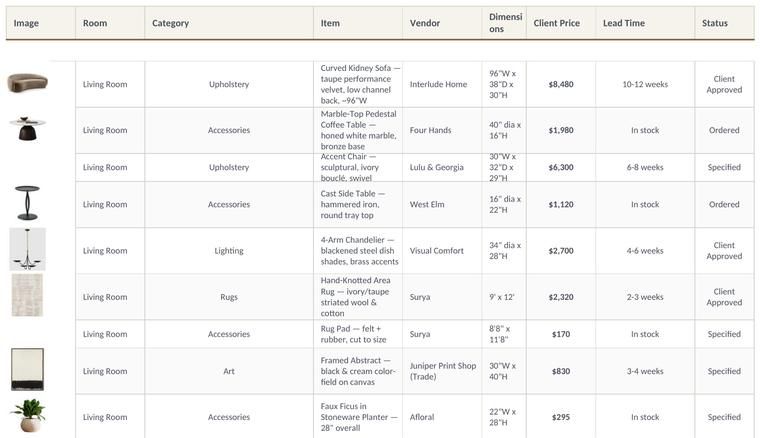
FF&E Schedules
Generate organized, client-ready FF&E schedules from briefs, spreadsheets, floor plans, or product links in minutes.
AI FOR PROCUREMENT
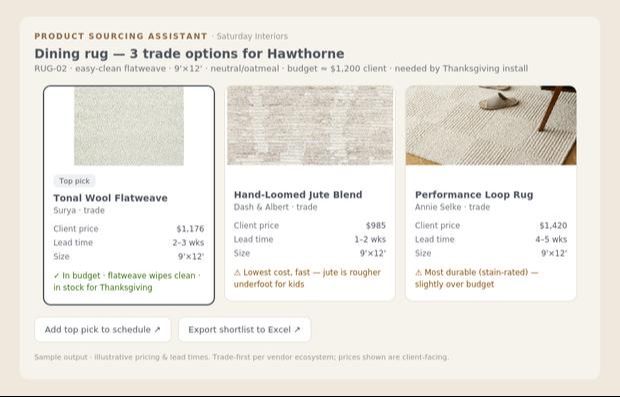
Product Sourcing Shortlists
Find spec-matched products from Trade vendors, whether you're sourcing for an entire room or need alternates.
AI FOR PROCUREMENT
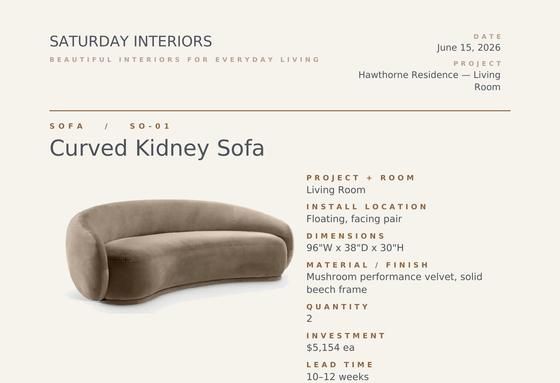
Client-Ready Tear Sheets
Generate polished, branded tear sheets for one product or an entire project in just a few clicks.

AI FOR DESIGN VISUALIZATIONS
Concept Imagery
Explore dozens of design directions in minutes before investing hours into development.
AI FOR DESIGN VISUALIZATIONS
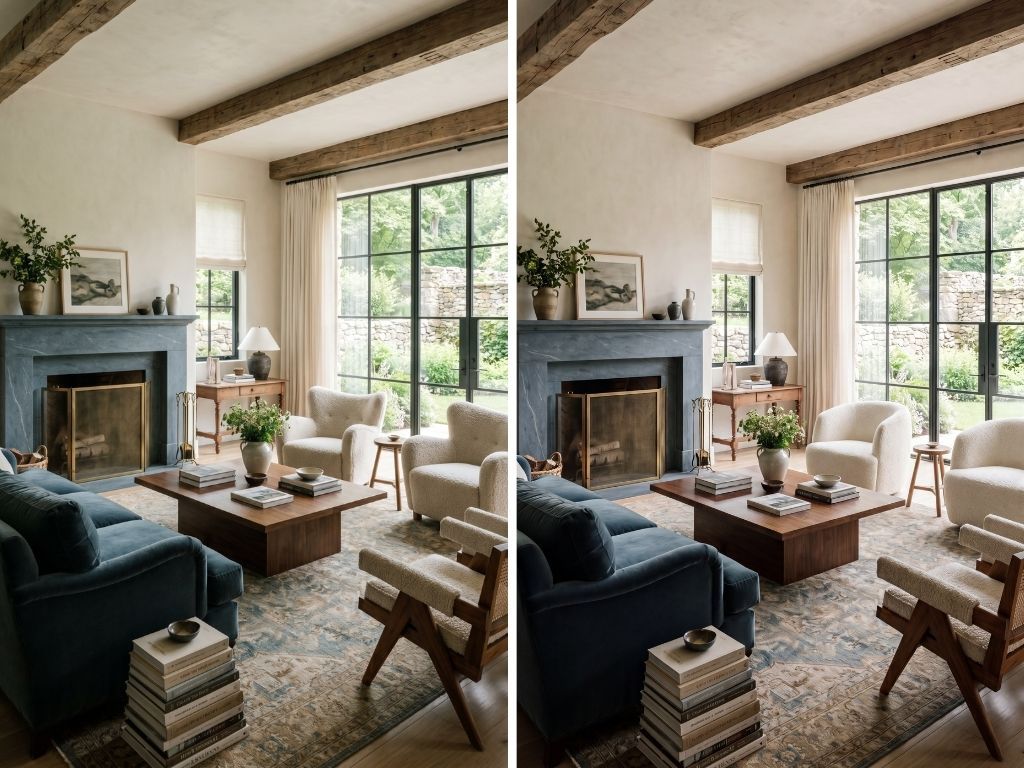
Alternative Design Options
Generate multiple layouts, palettes and material combinations to help clients make decisions faster.

AI FOR DESIGN VISUALIZATIONS
Photorealistic Renderings
Transform sketches, floor plans and SketchUp perspectives into stunning visuals.
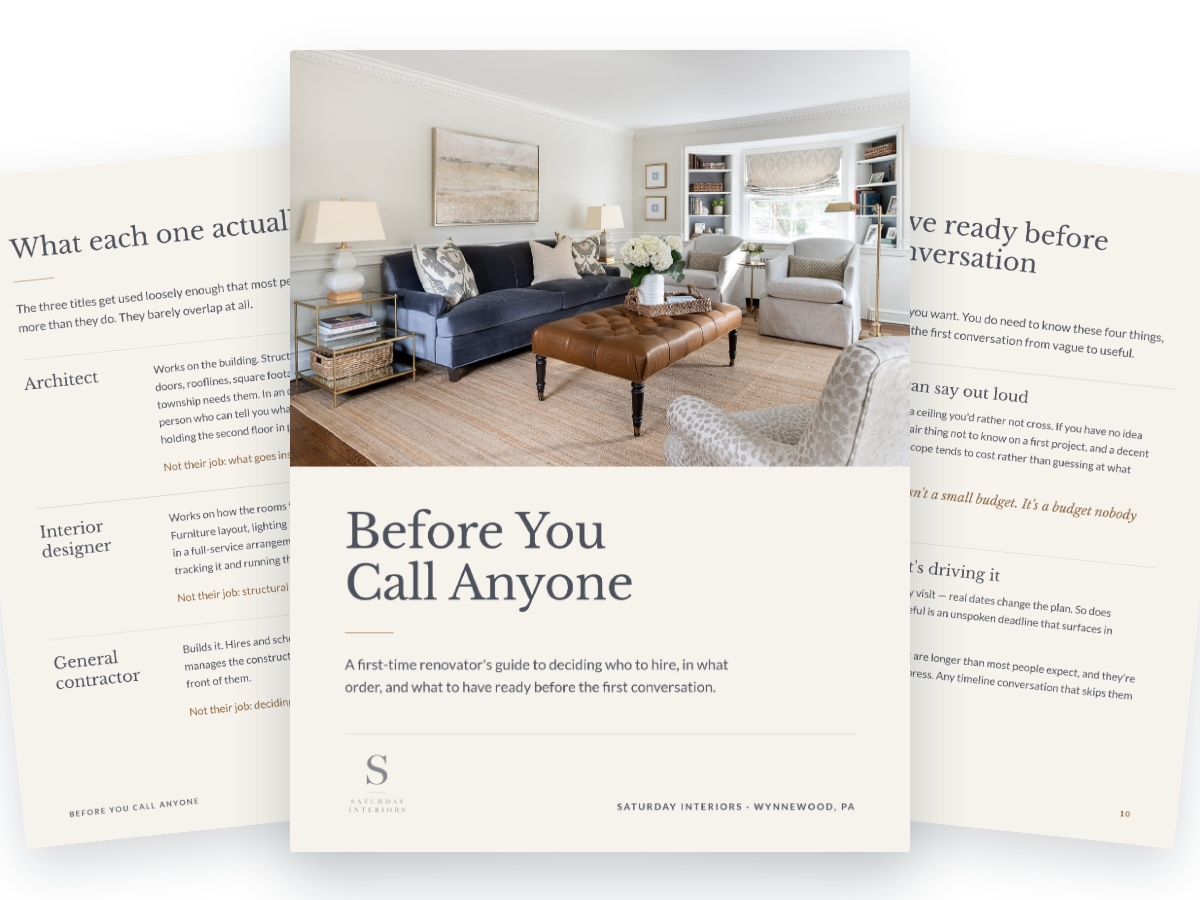
AI FOR MARKETING
Branded Lead Magnets
Build a guide, checklist, or resource your ideal client will genuinely find valuable, written and designed in your firm's brand.
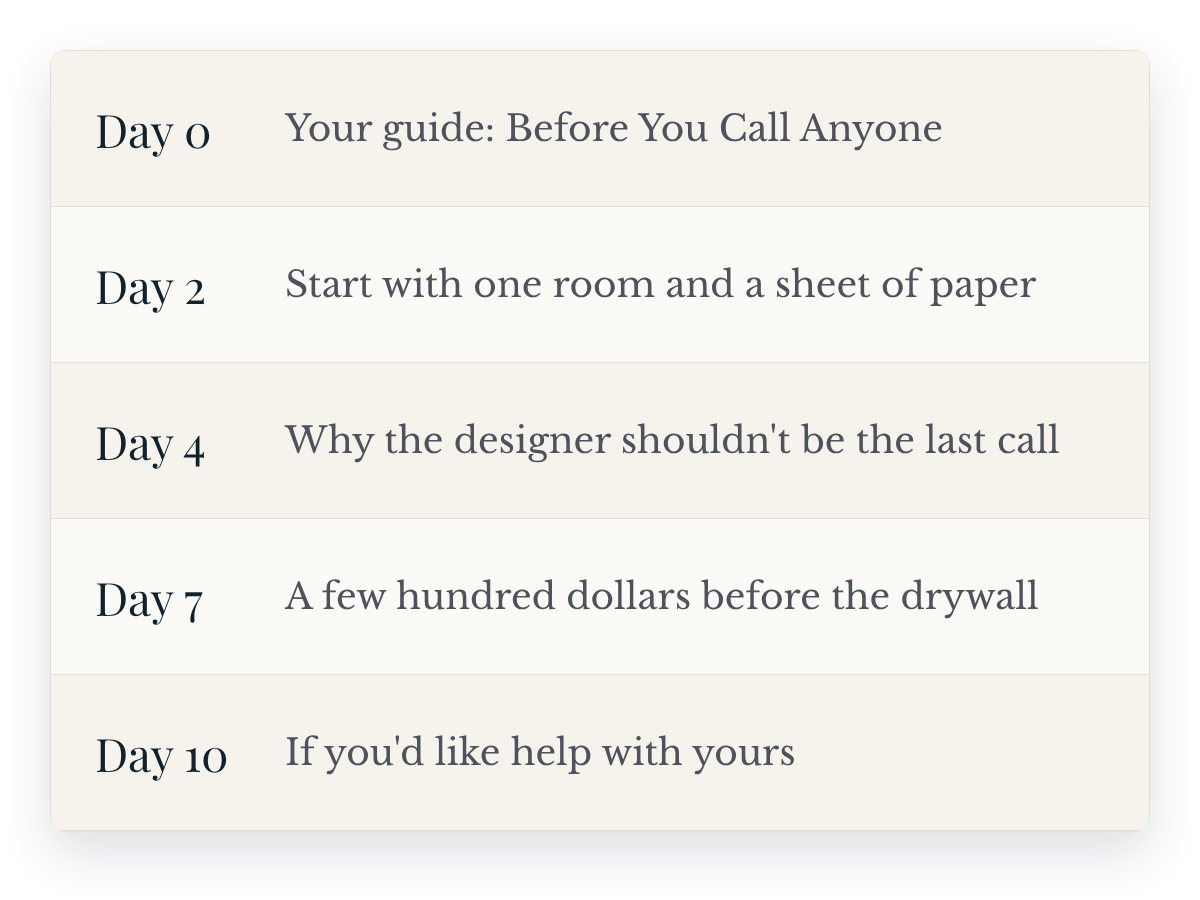
AI FOR MARKETING
Email Nurture Sequences
An automated five-email series that introduces your firm, builds trust and encourages potential clients to take the next step.
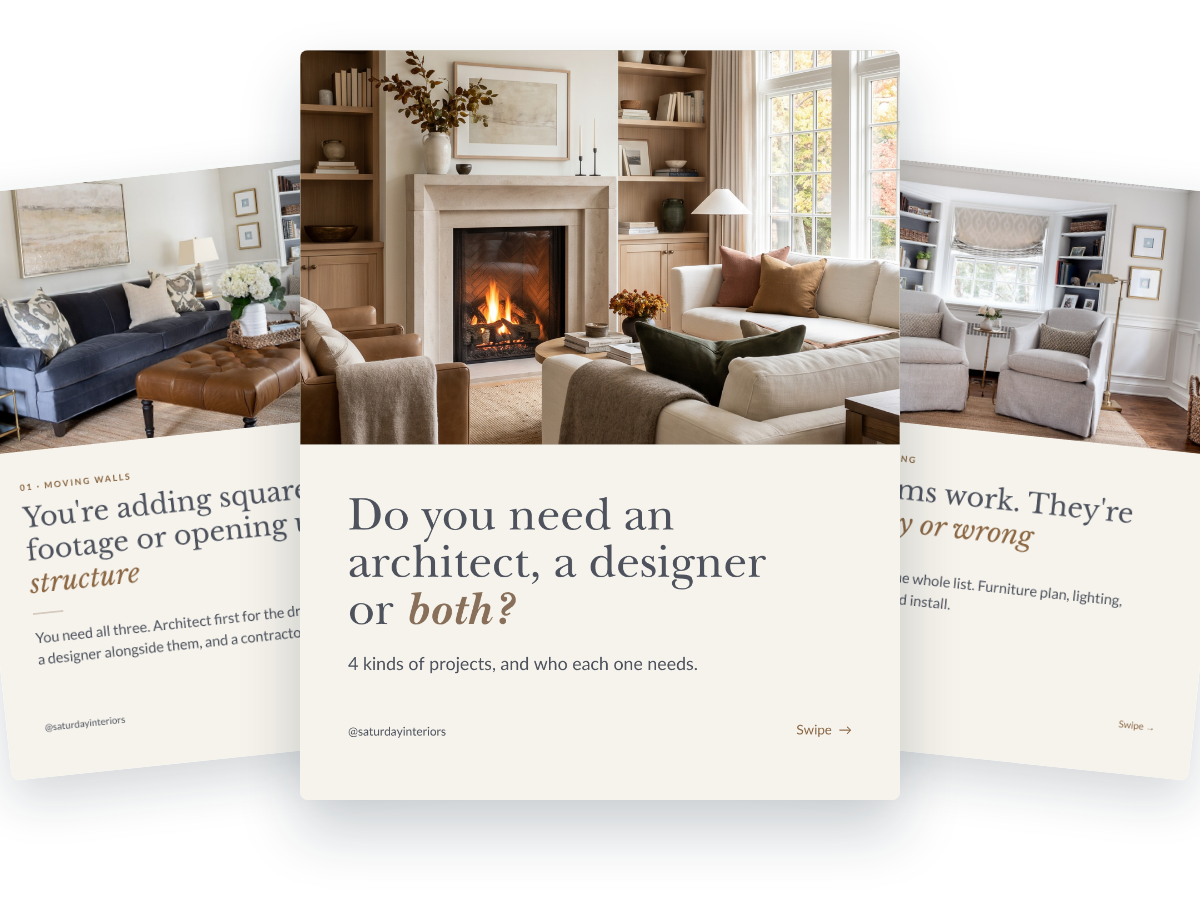
AI FOR MARKETING
On-Brand Carousels
Create editable carousels in your firm's brand, then repurpose them into newsletters that keep your firm top of mind.
AI keeps changing. Your Hub changes with it
The courses give you the system. The live monthly calls and the community are what keep it working as the tools shift — a new workflow built with you every month, foundation courses kept current as platforms change, and 2,300+ designers to ask when you get stuck. That's what your membership renews for.

THE COMMUNITY HUB
2,300+ designers implementing alongside you
Share what's actually working in your firm right now. Post questions, share wins, and see real workflows from designers in projects like yours.
✓ Private members-only community
✓ Direct access to Stacy for Q&A
✓ Searchable archive of past discussions and workflows
✓ Designers from 33+ countries already inside
✓ Dedicated channels for exchanging prompts, sharing insights, asking questions and celebrating wins
What you'd pay à la carte
Buying individual courses adds up fast. Here's what your Hub membership actually covers.
Lock in today's rate. Prices for new members will go up — but yours never will, as long as your membership renews without interruption.
Not ready for the full membership?
Start with one course and move up to the Hub whenever you're ready. Browse individual courses →
I enthusiastically recommend Stacy's AI course! In a simple manner, Stacy introduced us to the latest AI tools as they relate to creating and editing interior renderings.
Packed with great information and formatted in a clear, smooth, easy-to-follow format. Not overwhelming, and I love that you can go back and revisit the course for refresher moments as necessary.
Excellent training! Very helpful to keep in step with what AI is throwing at us. It's fun and Stacy makes it easy to understand. I would highly recommend this course to any designer who wants to keep up in the future.
Stacy is phenomenal! She led both a session at our commercial design event and a private training for our internal design team—and it completely shifted how our designers think about AI.
We were all so impressed! Stacy taught our office, architecture and ID, the AI for Interior Designers course. Learning about the tools out there and best practices was helpful to all of our disciplines.
The best money I have ever spent for my business. Stacy is an amazing teacher and the course is concise, extremely well organized, and easy to follow with plenty of action items along the way.
A wealth of knowledge. Stacy was extremely helpful and valuable to our community. She brings it into an easy-to-understand format!
Loved the AI for Interior Designers course! Stacy teaches in a clear, easy-to-follow way, and I feel confident in advanced creation and editing techniques with MidJourney and ChatGPT.

Stacy Thorwart
I've trained more than 8,500 interior designers and architects worldwide on how to bring AI into their work with clarity and confidence — without losing the craft that makes them designers.
Before The Intelligent Designer, I spent over a decade in commercial interiors, most recently leading global AI strategy at Steelcase, the world's largest office furniture manufacturer and a Fortune 500 company — building the kind of scalable AI frameworks most firms never get access to.
I built the Hub because I was tired of watching brilliant designers get left behind by training that was too technical, too generic, or too disconnected from how a real firm operates. This is the system I wish every designer had.
Things designers ask before joining
I'm not techy. Will I actually be able to do this?
Can I earn CEU credit through the Hub?
Is this a membership or a one-time purchase?
Do you offer pricing for my whole studio?
Can I start individually and switch to a Studio Membership later?
Which AI tools will I need to pay for?
I've taken AI courses before. How is this different?
The designers who adapt will lead
You don't need to become an AI expert. You need a system built for design work — and the workflows to put it to use this week.
For one designer
- One individual login
- The complete Hub curriculum
- Monthly live calls and recordings
- The private community
- Cancel any time
For up to six designers
- An individual login for every designer
- Complete Hub access for each enrolled designer
- Monthly live calls and recordings
- The private community
- Cancel any time or reassign seats when your team changes
Have more than six designers? Contact me for custom studio pricing.