
AI training built for how interior designers actually work
The complete system for building AI into how your firm operates — the foundations, the tools, and the step-by-step workflows for procurement, visualization, marketing and client work. Plus the live monthly calls and 2,000+ designers implementing alongside you.

You've seen what AI can do. But you haven't seen real results from it.
You've tried ChatGPT. Maybe Midjourney. Maybe Claude. But the results feel generic, the workflows don't stick, and you're back to doing things the slow way.
01
You're using AI like a chatbot, not like a system
Asking questions and copying answers isn't a workflow. Real leverage comes from skills built around how your firm works — and most designers have never been shown what that looks like.
02
The generic AI advice doesn't fit design firms
Tutorials made for marketers and corporate teams skip everything that matters in a design business — FF&E, procurement, client comms, presentation work, renderings.
03
You don't have time to figure it out alone
You're already working at capacity. You don't need to learn prompt engineering from scratch — you need workflows, skills, and a path built specifically for design work.
A complete AI playbook for designers.
One path, in order. Start with the fundamentals so you understand AI itself. Then learn the tool your workflows run on. Then apply it to the real jobs inside your firm — procurement, visualization, marketing and client work.
Each course includes video tutorials, lesson resources, action steps and prompt guides. Click any course below to see what's inside, all included with your Hub membership.

AI Fundamentals

Claude Foundations

AI for Procurement

AI for Design Visualizations

AI for Marketing
What you'll actually build
Every course turns into client-ready work you can use the same day — schedules, sourcing shortlists, tear sheets, concept designs, renderings and more. Here's a look at what designers are producing inside the Hub.
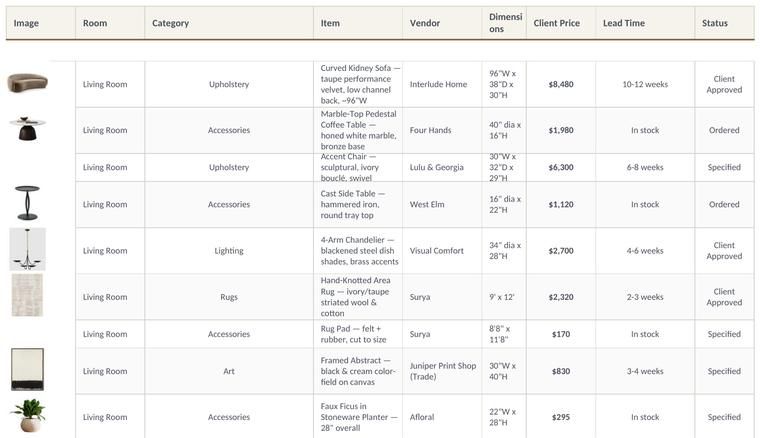
FF&E Schedules
Generate organized, client-ready FF&E schedules from briefs, spreadsheets, floor plans, or product links in minutes.
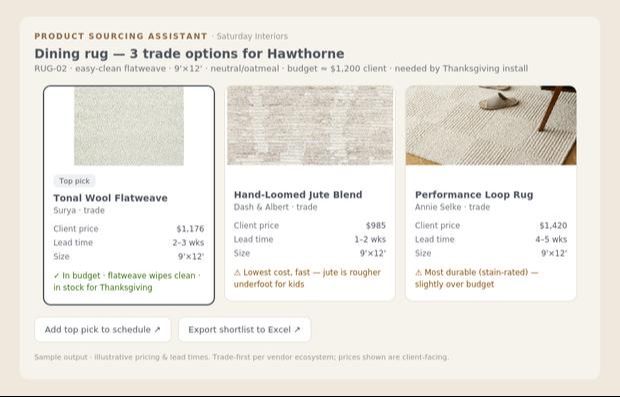
Product Sourcing Shortlists
Find spec-matched products from Trade vendors, whether you're sourcing for an entire room or need alternates.
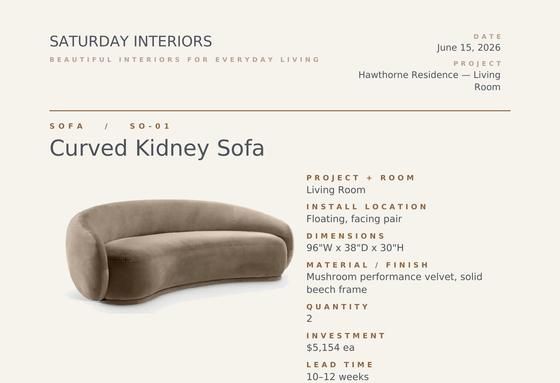
Client-Ready Tear Sheets
Generate polished, branded tear sheets for one product or an entire project in just a few clicks.

Concept Imagery
Explore dozens of design directions in minutes before investing hours into development.
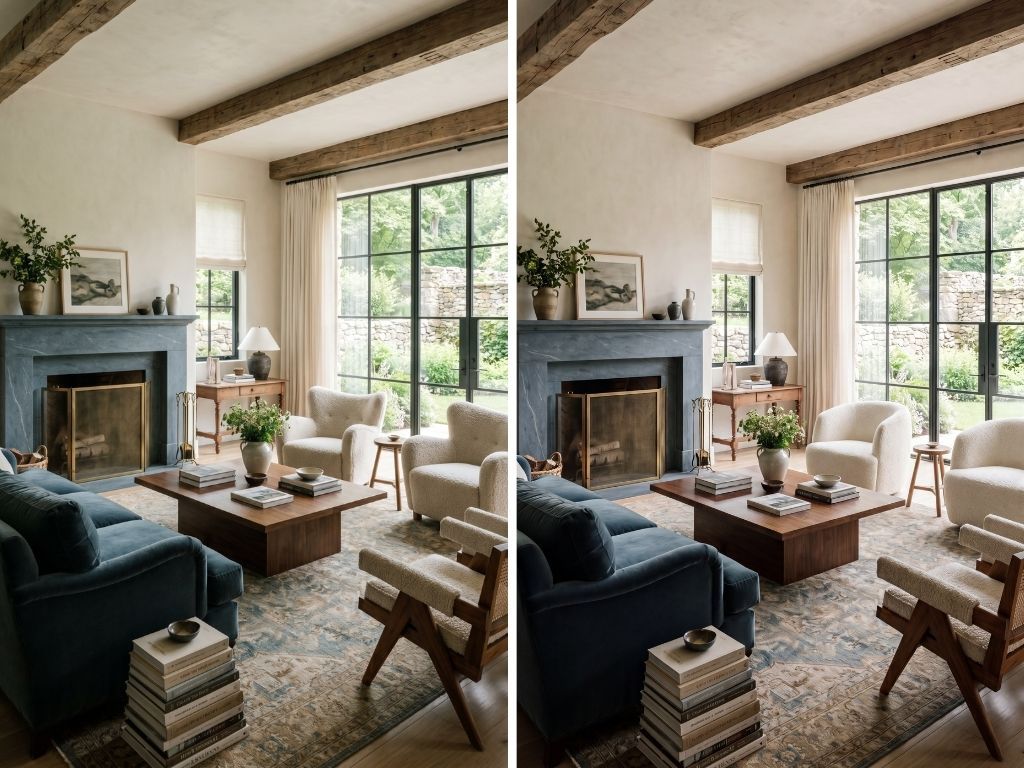
Alternative Design Options
Generate multiple layouts, palettes and material combinations to help clients make decisions faster.

Photorealistic Renderings
Transform sketches, floor plans and SketchUp perspectives into stunning visuals.
AI keeps changing. Your Hub changes with it
The courses give you the system. The live monthly calls and the community are what keep it working as the tools shift — a new workflow built with you every month, courses updated as platforms change, and 2,000+ designers to ask when you get stuck. That's what your membership renews for.

The Community Hub
2,000+ designers sharing what's actually working in their firms right now. Post questions, share wins, and see real workflows from designers in projects like yours.
- Private members-only community
- Direct access to Stacy for Q&A
- Searchable archive of past discussions and workflows
- Designers from 33+ countries already inside
- Dedicated channels for exchanging prompts, sharing insights, asking questions and celebrating wins

Live Monthly Calls
Every month we build an AI workflow you can use immediately — start to finish, in real time.
- Every call recorded and added to your Member Library
- Implementation challenge to help you apply what you learned to your firm
- Upcoming Live Calls:
- September 16: Build Your Brand System with Claude Design
- October 21: Build a 3D Room from a Floor Plan with Claude + SketchUp
- November 18: Build an AI Agent for Any Design Workflow
What you'd pay à la carte
Buying individual courses adds up fast. Here's what your Hub membership actually covers.
Lock in today's rate. As new courses are added throughout 2026, prices will go up — but yours never will, as long as your membership renews without interruption.
Not ready for the full membership?
Start with one course and move up to the Hub whenever you're ready. Browse individual courses →
I enthusiastically recommend Stacy's AI course! In a simple manner, Stacy introduced us to the latest AI tools as they relate to creating and editing interior renderings.
Packed with great information and formatted in a clear, smooth, easy-to-follow format. Not overwhelming, and I love that you can go back and revisit the course for refresher moments as necessary.
Excellent training! Very helpful to keep in step with what AI is throwing at us. It's fun and Stacy makes it easy to understand. I would highly recommend this course to any designer who wants to keep up in the future.
Stacy is phenomenal! She led both a session at our commercial design event and a private training for our internal design team—and it completely shifted how our designers think about AI.
We were all so impressed! Stacy taught our office, architecture and ID, the AI for Interior Designers course. Learning about the tools out there and best practices was helpful to all of our disciplines.
The best money I have ever spent for my business. Stacy is an amazing teacher and the course is concise, extremely well organized, and easy to follow with plenty of action items along the way.
A wealth of knowledge. Stacy was extremely helpful and valuable to our community. She brings it into an easy-to-understand format!
Loved the AI for Interior Designers course! Stacy teaches in a clear, easy-to-follow way, and I feel confident in advanced creation and editing techniques with MidJourney and ChatGPT.

Stacy Thorwart
I've trained more than 8,500 interior designers and architects worldwide on how to bring AI into their work with clarity and confidence — without losing the craft that makes them designers.
Before The Intelligent Designer, I spent over a decade in commercial interiors, most recently leading global AI strategy at Steelcase, the world's largest office furniture manufacturer and a Fortune 500 company — building the kind of scalable AI frameworks most firms never get access to.
I built the Hub because I was tired of watching brilliant designers get left behind by training that was too technical, too generic, or too disconnected from how a real firm operates. This is the system I wish every designer had.
Things designers ask before joining
I'm not techy. Will I actually be able to do this?
Is this a membership or a one-time purchase?
Do you offer pricing for my whole studio?
Can I start individually and switch to a Studio Membership later?
Which AI tools will I need to pay for?
I've taken AI courses before. How is this different?
The designers who adapt will lead
You don't need to become an AI expert. You need a system built for design work — and the workflows to put it to use this week.
For one designer
- One individual login
- The complete Hub curriculum
- Monthly live calls and recordings
- The private community
- Every new course released while your membership is active
- Cancel any time
For up to six designers
- An individual login for every designer
- Complete Hub access for each enrolled designer
- Monthly live calls and recordings
- The private community
- Every new course released while your membership is active
- Cancel any time or reassign seats when your team changes
Have more than six designers? Contact me for custom studio pricing.